- Published 7 Sept 2026
- Last Modified 7 Sept 2026
- 8 min
A Comprehensive Guide to Flash Memory
Find all the answers to your questions and learn more in this comprehensive guide to flash memory.


What is Flash Memory?
Flash memory is a solid-state electronic memory storage medium. It enables easy access for users to erase and reprogram data, and is used in a wide range of devices including SD cards and USB sticks, as well as more specialised industrial applications.
There are two main types of flash memory – NAND and NOR. NAND flash memory is usually used for general-purpose data storage and transfer, whereas NOR flash memory is typically used for storing digital configuration data. NAND is the most common type and is found in devices such as USB drives and SD cards.
Flash Memory Characteristics
Flash memory card characteristics are important as they determine the unique capabilities of any given chip. Characteristics can include capacity, reliability, and speed rating. Flash storage devices are typically defined by their small physical size, making them portable, accessible, and convenient for transportation.
Flash memory speed is normally marked on the chip, making it easy to identify. The speed typically relates to approved standards. Flash memory is also a highly reliable method of data storage and some products from reputable brands include error detection and correction functionality.
Flash Memory Capacity Chart
The capacity of a device using flash memory will depend on the type of data being stored and the size of individual data files. Although this will not always be completely exact, the below chart should prove useful as rough guidance:
Capacity | Documents | Images | Videos |
|---|---|---|---|
| 512MB | 450 | 307 | 1 hour |
| 1GB | 900 | 614 | 2 hours |
| 2GB | 1800 | 1229 | 4 hours |
| 4GB | 3600 | 2457 | 9 hours |
| 8GB | 7200 | 4915 | 18 hours |
| 16GB | 14,500 | 9830 | 36 hours |
It is also important to note that not all of the storage capacity listed on a particular device will be available for data storage. This is because some of the capacity will be taken up with system functions like formatting.
Types of Flash Memory Devices
The most common types of flash memory are SD, micro SD, and compact flash. Memory cards and USB drives are in widespread use and are ideal for a wide range of applications.

Flash Memory Cards
A flash memory card is a removable, transferable method of memory storage. It is designed to increase the memory capacity of the item it is plugged into and is available in various sizes.

Flash Memory USB Drives
A flash memory stick is designed to plug into the USB drive of various devices including PCs and smart TVs. They act as external, removable storage devices.
How Does Flash Memory Work?
Flash memory is a solid-state memory storage chip, made to an internationally approved standard. Flash memory devices use stacked cells to store large amounts of data in increasingly smaller areas. Multi-level cells (MLCs) are increasingly being used to cater to the constant demand for higher quantities of data and smaller sized devices. MLCs mean that single memory cells employ multiple logic levels to achieve this.
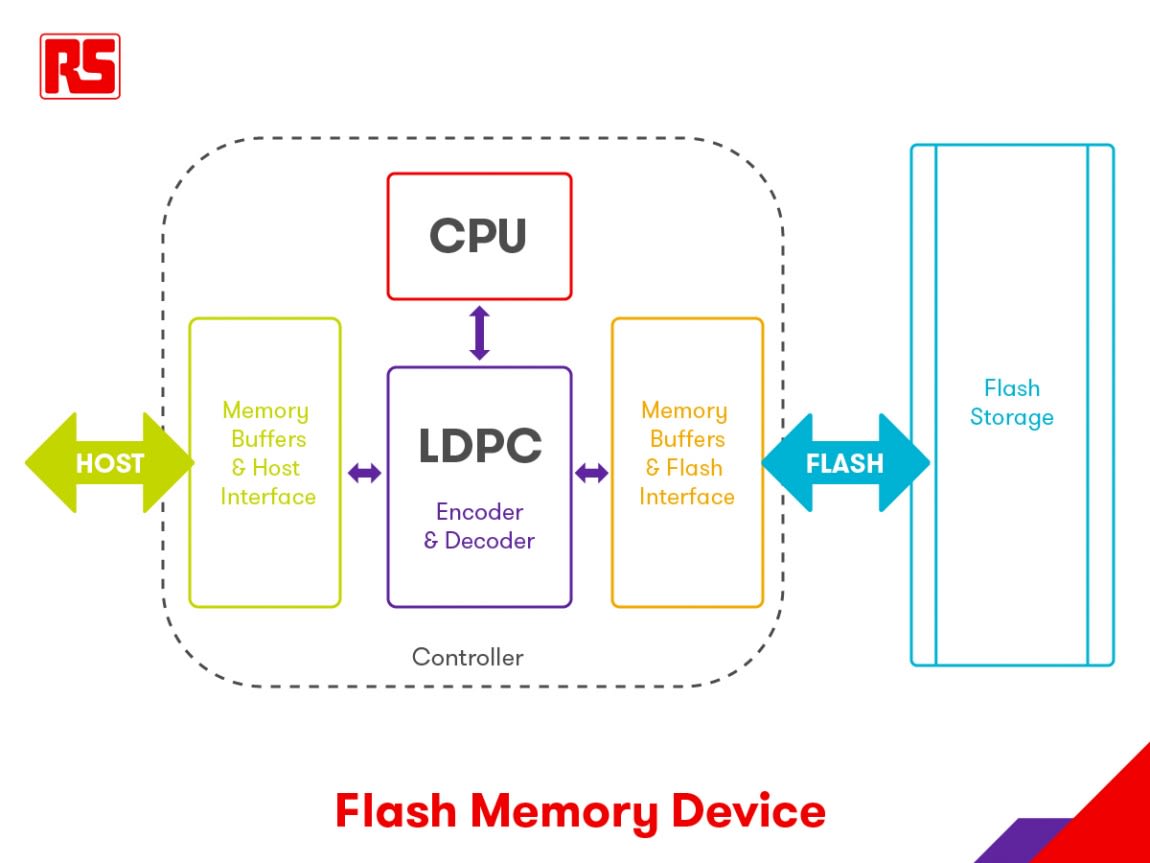
Standard flash storage devices will include a memory stack and controller. The memory stack contains the cells where the data is stored, as explained above. The memory controller acts as a common interface between the memory and the host device. It manages communication between the two and typically supports a range of protocols and technologies such as USB, UFS, and PCI.
When a user sends data to the flash memory, the controller buffers it through its interface and encodes the data. The data is then stored in the memory via the flash interface. On the flip side, when a user requests access to data stored on a flash memory device, the data is decoded and sent to the host device via the interface and memory buffer.
Flash Memory Diagram
The image below depicts a simple diagram showing the components of a standard memory device package.
What is Flash Memory Used for?
Flash memory is primarily used to add extra memory to the inherent onboard memory of a device. It can be found across a wide variety of industries as well as domestic applications and is commonly available due to its adaptability.
Devices that use flash memory are in widespread use, thanks to the versatility of the technology. Just some examples of devices that use flash memory include:
- Mobile phones
- PCs and laptops
- Digital cameras
- Smart TVs
- GPS systems
- Security systems
- Military
- Communications and networking
- SSD drives
- Retail management
- Medical
Browse Flash Memory Microchips
Shop From Our Selection of Flash Memory Microchips:

- RS Stock No. 171-2222P
- Mfr. Part No. W25Q128JVSIQ/TUBE
Each (Supplied in a Tube)
£2.013

- RS Stock No. 165-2021
- Mfr. Part No. SST39SF020A-70-4C-PHE
Each (In a Tube of 11)
£2.46

- RS Stock No. 914-2816
- Mfr. Part No. MX29LV160DBTI-70G
Each (In a Pack of 5)
£2.236

- RS Stock No. 869-6179
- Mfr. Part No. SST26VF064B-104I/SM
Each (In a Pack of 2)
£3.71

- RS Stock No. 171-2228
- Mfr. Part No. W25Q32JVSSIQ/TUBE
Each (In a Pack of 10)
£1.218
How to Use Flash Memory
Modern flash memory chips are simply handled by the device once the card or USB stick has been inserted. This provides a handy plug-and-play functionality and ensures the additional benefits of using flash memory are quick and easy to enjoy.
How to Program Flash Memory
Formatting a flash memory SD card is beneficial as regular formatting refreshes the device, removing any traces of previous data and restoring maximum performance. If you have a flash memory SD card, the recommended method for how to format a compact flash memory card is to use the official SD formatter. This is a piece of software that can be downloaded to format a range of flash memory cards. It is optimised specifically for use with these devices and is designed to provide an appropriate formatting solution.
Should you find yourself in need of additional capabilities, the process of how to upgrade flash memory is very simple. The easiest way to upgrade flash memory is to remove the old chip, card, or USB stick and replace it with a larger or faster alternative with the added functionality you require.
How to Test Flash Memory
Flash memory devices are formatted during the manufacturing process to ensure reliability and ease of access from the host device. The act of formatting the device means that host devices can access the memory, store and retrieve data as required.
The process of formatting a flash card or drive is as follows:
- Testing the device’s memory cells
- Identifying any faulty cells
- Protecting data by ensuring faulty cells cannot read or write stored data
- Reserving a number of cells to act as spares if additional cells become faulty in the future
- Reserving a number of cells for essential system requirements such as firmware updates
- Creating a file management system for storage and access of files
How to Erase Flash Memory
Erasing a flash memory device will free up storage space by permanently deleting old files from the device. It is recommended to backup any data currently stored on the device before erasing files.
Follow these steps to clear a flash drive:
- Plug the device into a host device (typically a PC or laptop)
- Locate the device settings via the PC menu
- Select the format option
- Additional settings may be required, depending on your particular device
- Format the device to erase data and clear the flash drive


Advantages and Disadvantages of Flash Memory
There are various advantages and disadvantages to using flash memory to provide additional storage for devices. Some of the key benefits and drawbacks are explained in greater detail in the sections below.
Advantages
Flash memory is widely available and is compatible for use with many different devices. Its advantages include:
- Affordable and cost-efficient
- Fast
- High-capacity
- Typically stable
Disadvantages
As with any technology, flash memory also has some disadvantages which should be taken into consideration. These include:
- Some cheaper models are lower quality
- If you do not purchase from a reputable brand or supplier, you may run the risk of purchasing a counterfeit product
- Quality may degrade over prolonged periods
- Limitations with rewriting data