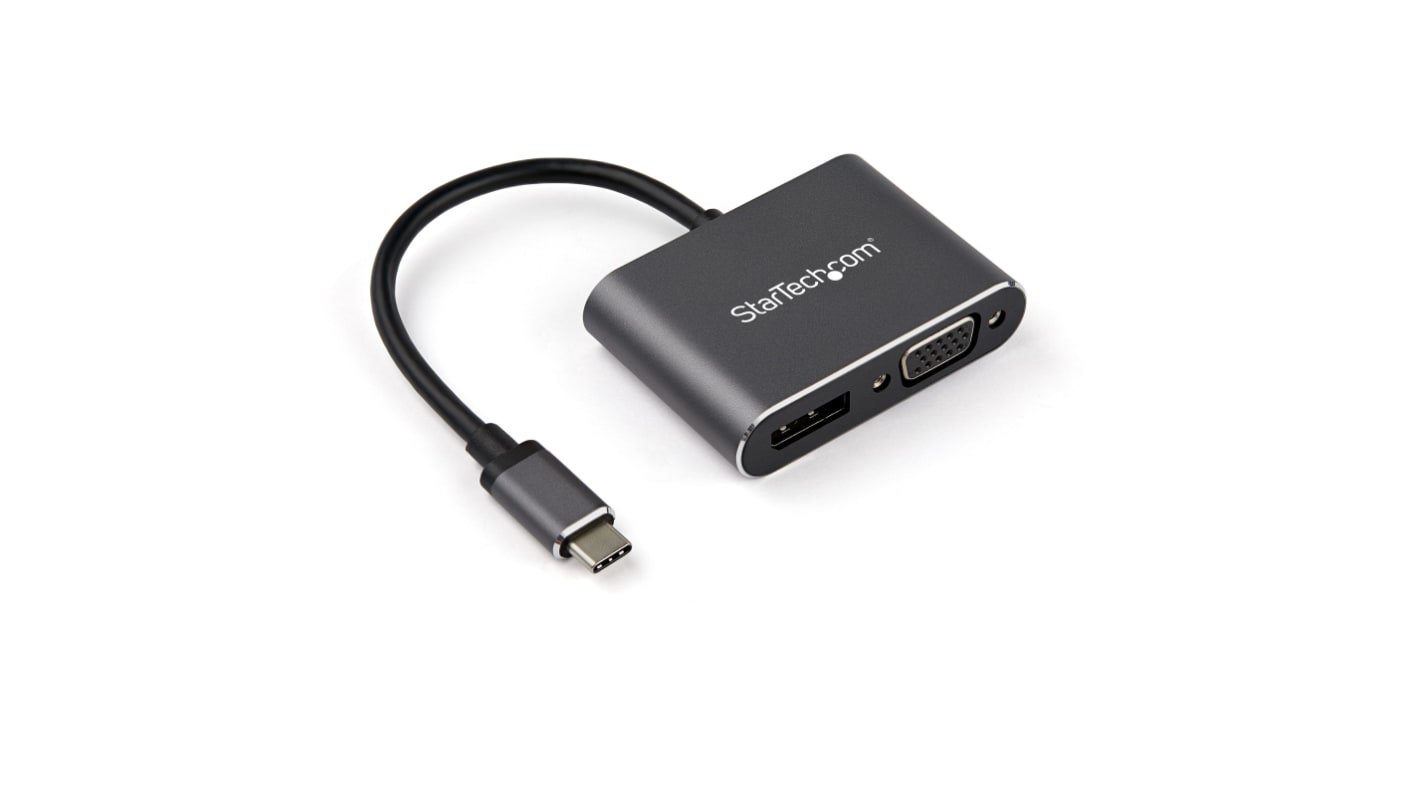
StarTech.com USB C to DisplayPort, VGA Adapter, 1 Supported Display(s) - 4K @ 60Hz
- RS Stock No.:
- 223-0906
- Mfr. Part No.:
- CDP2DPVGA
- Brand:
- StarTech.com

Stock information currently inaccessible
Alternative
This product is not currently available. Here is our alternative recommendation.

Each
£52.87
(exc. VAT)
£63.44
(inc. VAT)
- RS Stock No.:
- 223-0906
- Mfr. Part No.:
- CDP2DPVGA
- Brand:
- StarTech.com
Specifications
Technical Reference
Legislation and Compliance
Product Details
Find similar products by selecting one or more attributes.
Select all | Attribute | Value |
|---|---|---|
| Brand | StarTech.com | |
| Thunderbolt Connector Type | Thunderbolt 3 | |
| Refresh Rate | 60Hz | |
| Maximum Resolution | 4K | |
| Number of Displays Supported | 1 | |
| Video Connection Type | DisplayPort, VGA | |
| USB Connection Type | USB C | |
| Select all | ||
|---|---|---|
Brand StarTech.com | ||
Thunderbolt Connector Type Thunderbolt 3 | ||
Refresh Rate 60Hz | ||
Maximum Resolution 4K | ||
Number of Displays Supported 1 | ||
Video Connection Type DisplayPort, VGA | ||
USB Connection Type USB C | ||
- COO (Country of Origin):
- CN
StarTech.com 4k USB C to DisplayPort, VGA Cable - CDP2DPVGA
Designed with simplicity in mind, this adapter is an obvious choice for those wanting a high-end, easy to use solution for displaying HD video between modern and legacy devices. No need to worry about picture quality as the VGA output supports resolutions up to 1080p and a max 4k output for HDMI. The lead provides richer, sharper, and an enhanced feel to images and video. Plug the converter straight into a c-type computer for presentations or connect separate displays for a more productive work setup.
Cost-Effective and Economical
Eliminate the cost of upgrading whole systems and opt for this convenient USB C converter. Continue to utilise perfectly functionable legacy equipment rather than dispose of old equipment by utilising the VGA output.
For climate conscious customers, this reduces landfill as you’re not replacing systems and wires as often.
Superb Image Quality
This compact lead can also act as a splitter cable, supporting brilliant colour, improved contrast, and greater luminosity across two separate screens showing identical video signal.
The DP output has support for high definition video at an incredible 4K @ 60Hz (3840 x 2160). For the pixel peepers amongst us, users will be very pleased to know that resolutions of up to 1920x1200 (1080p) is perfectly achievable with this VGA adapter even with older VGA monitors, projectors, or TVs.
Highly Portable
Take this DisplayPort converter with you on the go whether you’re hot desking or working between different locations. It’s compact and lightweight and fits easy in your laptop bag or rucksack. Save space in your bag by not needing to bring two separate USB adapters with the 2-in-1 feature. This means you can deliver lectures and presentations on the move knowing you’re prepared for legacy and modern connections.
With an aluminium body, it can withstand the knocks and drops that come with transporting the VGA adapter from one location to another. And being space grey, match it with your MacBook too.
Easy Setup
A great feature of this VGA adapter cable is that it doesn't require any additional software to be downloaded to use it. With no set up needed, this active lead is incredibly easy to use, it’s truly plug and play.
Features and Benefits
• Lightweight and compact design
• Highly portable
• 1x male USB C port
• 1x VGA female receptacle
• 1x Female DP port
• Supports 1920x1200 / 1080p for VGA
• 4K support over HDMI @ 60Hz
• Save space by not carrying around two separate cables
• Compatible with macOS, Windows (including Windows 10), Chrome OS (Chromebook) and Linux
• Add an additional monitor to your set up
• Perfect pairing with your space grey MacBook
• Can use interchangeably with a Thunderbolt 3 port
• Supports 2x audio channels
• Highly portable
• 1x male USB C port
• 1x VGA female receptacle
• 1x Female DP port
• Supports 1920x1200 / 1080p for VGA
• 4K support over HDMI @ 60Hz
• Save space by not carrying around two separate cables
• Compatible with macOS, Windows (including Windows 10), Chrome OS (Chromebook) and Linux
• Add an additional monitor to your set up
• Perfect pairing with your space grey MacBook
• Can use interchangeably with a Thunderbolt 3 port
• Supports 2x audio channels
FAQs
What are the applications of this adapter?
Present and lecture with a high-definition slide show and be ready with different connection options. Take this USB adapter cable into the office or use at home, lightweight and compact, slide this into your laptop bag and be ready wherever you go. Users can also use this to set up an extra display for working or gaming.
What is a USB-C to VGA multiport adapter?
A multiport adaptor is a small device which allows a user to convert from one port type to another. In this case USB C to VGA is available on this adapter and is used to show videos, present to an audience, or use as a separate monitor.
How to connect USB type C to VGA?
To connect these two ports together, users need a cable converter, like this one from StarTech. It has both port types required and is ready to plug straight into your setup.
How to convert USB C to DisplayPort?
Users can do this simple conversion with this StarTech.com adapter cable. Simply plug the display and host in at either end, and the active cable converts the signal to the intended display.
What is an active cable?
An active cable, such as this adapter, has an active conversion that allows it to perform the conversion itself, inside the wire, rather than use the source device.
What’s in the box?
• 1x USB C to VGA and DP Adapter