- Lorna Little
- Published 25 Sept 2026
- Last Modified 6 Nov 2026
- 6 min

Modbus TCP vs RTU Speed Tests
When it comes to Modbus TCP vs RTU speed tests, the technology is changing fast, but the clearest story sits in the data. This article pulls together the latest stats and reports to show market size and growth, where adoption is accelerating, and the biggest drivers and constraints.


Modbus has been an established industrial communication protocol since 1979. Companies still use it, with HMS Networks' 2025 industrial network survey reporting that TCP accounts for 4% of new automation nodes. Modbus RTU also keeps its place as a widely installed fieldbus protocol.
Both have lasted this long because of their simplicity. They use the same function codes and data, although the way they use data differs. RTU sends compact binary frames over serial RS-485 wiring, compared to TCP which uses Ethernet packets.
Below, we examine the trade-offs for both systems, on factors like noise resilience, speed, scalability, and distance.
The Physical Layer: Serial (RS-485) vs Ethernet
RTU runs over RS-485, a differential signalling standard built on a single twisted pair. The communication is half-duplex with a single master that controls the bus.
The controller polls each device sequentially, with connected devices only responding when asked. RS-485 supports baud rates ranging from 9,600 to 115,200 bits p/s. The hardware for this type of setup is simple, requiring only:
- Twisted-pair cables
- Termination resistors
- Low-cost transceivers
TCP, on the other hand, operates over standard Ethernet. It offers a huge bandwidth of up to 100 Mbps.
Most modern installations use gigabit network switches and network hubs for higher throughput of data. The technology also supports full-duplex communication and multiple client connections simultaneously.
This can cut the polling bottleneck you get with the single sequential bus of RTU, but you need more infrastructure, like:
- An industrial Ethernet connector
- Managed switches
- Proper IP configuration
Data Packet Structure and Overhead
For a standard read-holding-registers request, the RTU's 8-byte carries:
- One byte for the device address
- One for the function code
- Four for the data payload
- Two CRC (cyclic redundancy check) for handline error checking
It's lean by design, with every byte counting on a serial line.
If you were to send the same request over TCP, a 12-byte application-layer frame is used instead. A seven-byte MBAP (Modbus Application Protocol) header replaces the address byte and CRC. The MBAP header carries a:
- Transaction ID
- Protocol ID
- Length (how many bytes follow)
- Unit ID
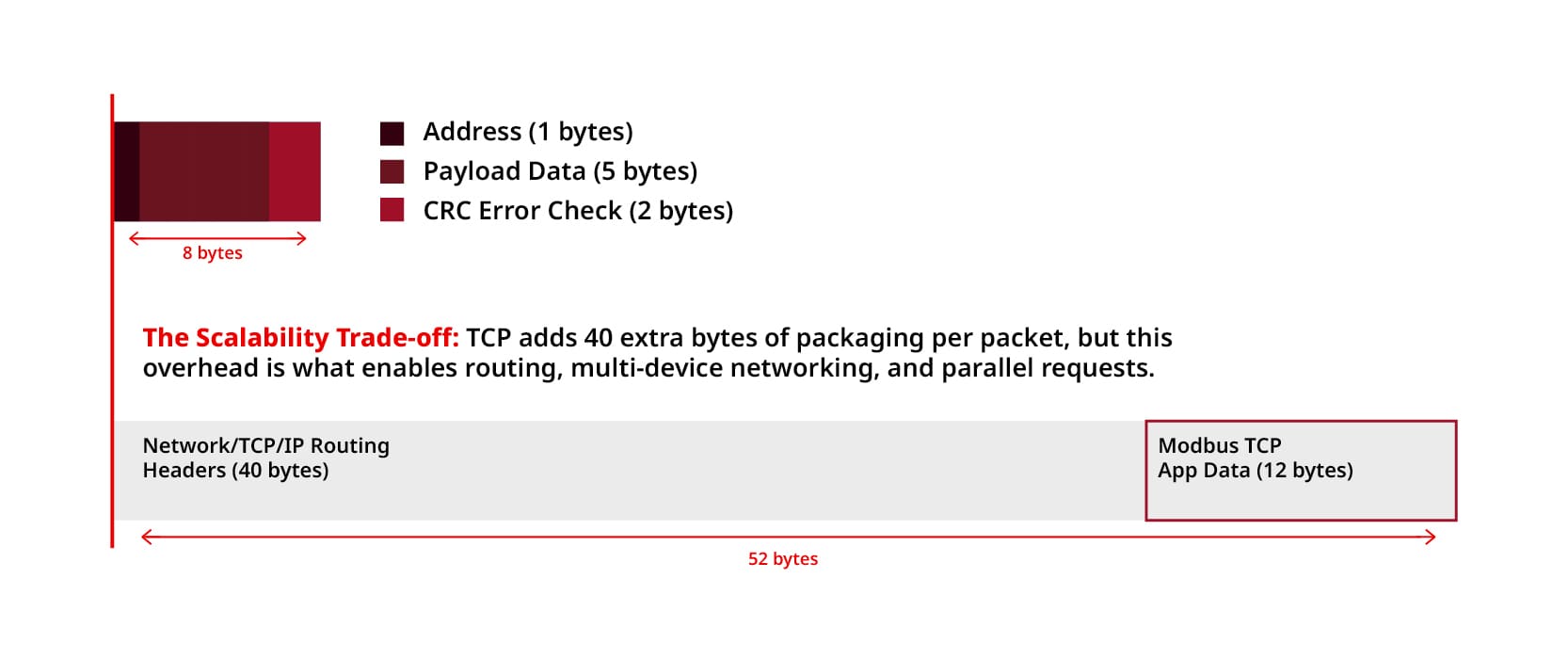
TCP doesn't need RTU's CRC because it detects errors at the network level. That saves a few bytes, but the total on-wire overhead is 40 extra bytes higher thanks to each message's extra packaging. That additional comes from the Ethernet, IP, and TCP headers, which add roughly 40 more bytes per packet.
With TCP, this packaging handles the routing and connection management, something the RTU leaves to its app.
MBAP header's transaction ID lets a TCP client send multiple requests without waiting for each response. RTU cannot do this, and this is the practical trade-off with the serial protocol allowing only one transaction at a time.
So, RTU's compact frame wins on efficiency. But for multi-device architectures, TCP's overhead is the cost of scalability.
Speed Comparison: Query Response Times
In practice, the speed with which you get data back matters more than actual bandwidth. This is the query-response time, or how long it takes on the round trip from request to reply.
At 9,600 baud, RTU takes 50–100 ms per device, dropping below 10 ms at 115,200 baud. However, even if you have a very high baud rate, what often causes the biggest delay is the processing time of your connected device. RTU polls sequentially, meaning it has to wait for each device to respond before asking the next one. The more devices on the bus, the longer the full cycle takes.
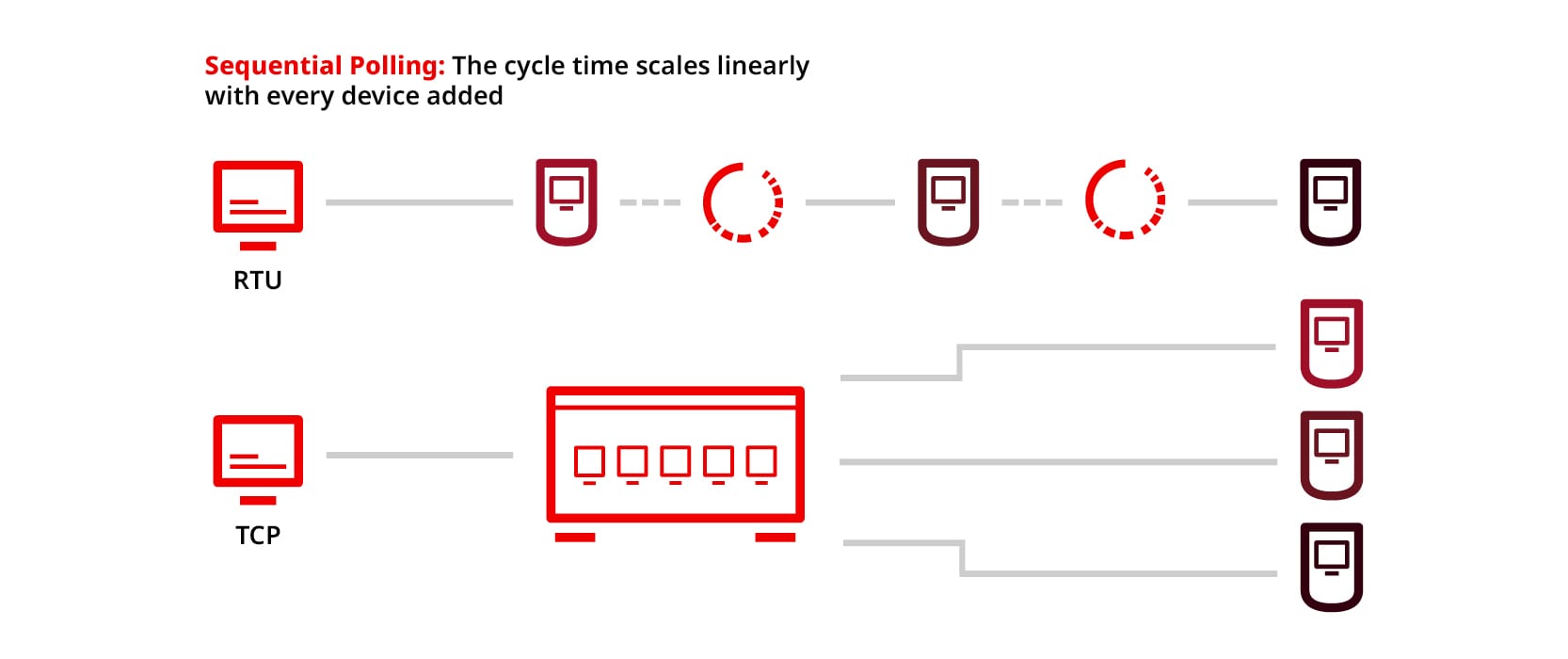
TCP doesn't have this problem. On lightly-loaded Ethernet networks, round-trip times under 2 ms are normal. Sending multiple requests at once without waiting for each reply also greatly speeds things up. This lack of idle time between polls is a big advantage for time-critical or large-scale systems.
RTU (9,600 baud) | RTU (115,200 baud) | TCP (100 Mbps Ethernet) | |
|---|---|---|---|
| Single query-response | 50–100 ms | 5–25 ms | Under 2 ms |
| 10-device poll cycle | 0.5–1.0 s | 50–250 ms | Under 20 ms |
| 50-device poll cycle | 2.5–5.0 s | 0.25–1.25 s | Under 100 ms |
| Connection model | Sequential (one master) | Sequential (one master) | Parallel (multiple clients) |
It's easier to predict the latency of RTU on a healthy bus correctly installed. However, it’s important to be aware that faults still cause timeouts and retries. TCP's latency varies with:
- Network load
- Switch queue depth
- Embedded TCP stack
Under normal conditions, TCP is faster. If there's a broadcast storm or heavy online traffic, a modest PLC can see response times spike.
Distance and Noise Immunity Considerations
According to the TIA-485, RS-485 lets you run up to 1,200 m of cable on a single segment with no repeaters needed. The distance you actually get depends on:
- Cable DC resistance
- Termination
- Signal margin
The distance drops a lot at higher data rates. At 2 Mbit/s, for example, it won't extend past around 60 m.
A run of 1,200 m will be enough to cover most of a large process plant or water treatment works. The issue is that standard copper Ethernet runs are rarely more than 100 m per segment. You can extend the range with manual switches, but that increases the price and the quantity of failure points.
The other factor you need to consider is how well each protocol handles electrical noise. RS-485's differential signalling is better at handling disruption to data signals from:
- Heavy motors
- VFDs (variable frequency drives)
- High-voltage switchgear
- Power cables running alongside data cables
They affect both wires equally, but because the receiver only reads the difference between the two wires, the noise cancels itself out. That's why RS-485 doesn't need any special cabling or shielding.
Ethernet can handle this well, too, with the right cable, robust shielding, and the correct grounding. High-EMI zones need more thought. Building robust industrial networks means planning the cable routes and shielding, as well as the grounding. With RS-485, the protocol handles noise for you.
Migrating from RTU to TCP with Gateways
Most sites already have an existing RS-485 Modbus infrastructure. What you have to do next is bring that data onto a TCP/IP network. Typical reasons include SCADA, remote monitoring, and digital industrial maintenance platforms.
Many firms choose a protocol gateway for their migration. This is a device that sits between your RS-485 bus and your Ethernet. It translates RTU messages into TCP packets, enabling both devices to communicate.
Businesses choose this as their standard migration path because they can keep their existing field devices and wiring in place. It also makes RTU data available to tools, such as digital twins and supply chain optimisation platforms.
There is an important limitation you need to know about, though. Having a gateway does not speed up the serial side. If you have 20 RTU devices on a serial bus, the gateway still polls them one by one at the original baud rate.
Moxa's engineering guidance is clear on serial port bandwidth staying the same. The Ethernet side gets the data faster, but only after the serial side has finished collecting it.

Lorna is an SEO Content Specialist at RS, where she creates search-led content focused on topics including industrial innovation, engineering, maintenance, and procurement. After studying Creative & Professional Writing at Canterbury Christ Church University, she built her career in SEO and content marketing across both agency and in-house environments, helping readers navigate technical subjects through informative, user-focused content. Outside of work, Lorna enjoys reading, travelling, and making memories with her family.
Related Articles

LoRaWAN vs NB-IoT vs Sigfox
LoRaWAN, NB-IoT, or Sigfox? Compare the leading LPWAN technologies for range, battery life, and cost. Expert connectivity guide.
Read more

Network Switches - A Complete Buying and User Guide
What is a network switch? Find out more about how network switches are used, how they work, and what types are available using this complete buyers' guide.
Read more

The Solution to Building Robust Industrial Networks
Ensure reliable network connectivity in harsh industrial environments. Explore robust, industrial-grade switches and PoE technology to overcome challenges.
Read more